
Notice to Download New MT4 & MT5 platforms
MetaQuotes is updating our MetaTrader 4 & 5 servers and might require some desktop users to download and install these platforms from our website.
Note the following:
- Mobile terminal users will automatically connect using the new server name. No action is needed on mobile devices using these apps.
- WebTerminal users will be logged out and have to re-enter their login and password which will remain unchanged. Then these users will be logged into the new server.
- Desktop some users of older versions will need to download the platform(s) from our website – MetaTrader 4, MetaTrader 5
If you are using the latest version of Traders Way MetaTrader 4 or 5, this server update will complete automatically. This can be tested by simply opening the platform and seeing if you log in as usual. Otherwise, please download the above platform and install in the same folder as the original — your settings will remain intact and this installation will work just like a manual update. This is important for those who use EAs and have set up custom charts. To ensure that you are installing in the same location, follow the steps below which are the same for both MT4 & MT5:
1) Run the installation file after downloading the platform.
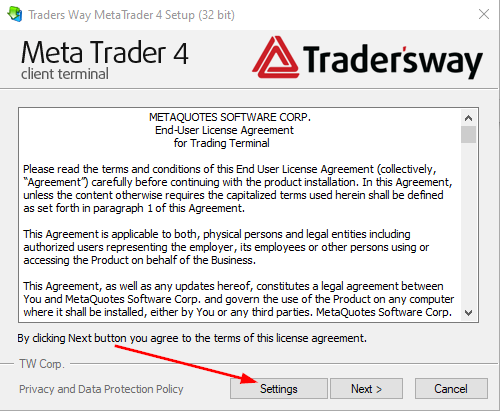
2) Click Settings on the bottom as shown.
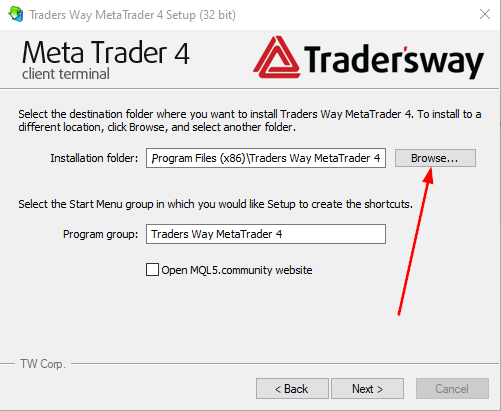
3) Click Browse next to the installation target folder.
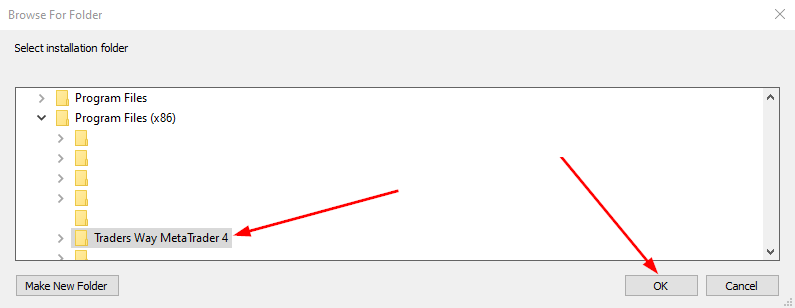
4) You will see a list of folders in the Program Files folder. Click on the Traders Way MetaTrader 4 or Traders Way MetaTrader 5 folder, depending on which platform you are updating. Then click OK and continue with the installation.
We apologize for any inconvenience this may cause and are available by email and live chat to assist with any questions you have.